
Hi Everyone,
This week we’ve got a handful of new features and improvement to My Music Staff that we think everyone will enjoy!
Here’s what new and improved this week:
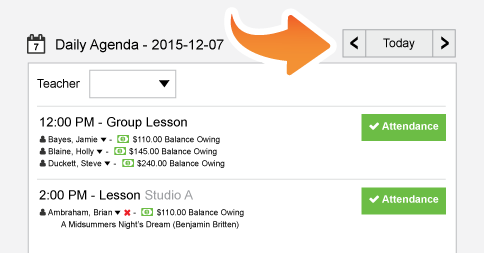
- On the home page « Agenda« , you can now change the date to peek ahead at tomorrow’s agenda (or backwards to see yesterday’s).
- The « Billable Hours » report now includes a grand total at the bottom of the report.
- If you’re accepting credit cards with Stripe and you charge a « Convenience fee » for online payments, the convenience fee details are now automatically captured and added to the family account.
- The « Lessons Taught » report now has an option so that you can create an « Hours Taught » report. It shows the same information but sums up the total number of hours per month/student/etc.
Changes for Multi-Teacher Studios:
- When entering Payroll payments, the « Expense Category » is now remembered for future payments.
- Teachers now have an « Instrument » field in their profiles. If Instrument is specified for teachers in your studio, the Sign-Up form will convert the « Instrument » field to a drop-down list, and the calendar 2.0 will group teachers by instrument in « Timeline » view.
- The calendar 2.0 now has the option to display events by Location in « Day » and « Timeline » view.
- There’s now a tiny bit of spacing between events on calendar 2.0 to match the look of the v1 calendar.
- « Timeline » can now be selected as a default calendar view in your « My Preferences » page.
- On the teacher profile page, there is now an « Attendance » column on the « Payroll » tab to make it easier to spot check the teacher’s attendance history.
- The « Payroll » report also has a new « Attendance » option that includes the attendance if the Payroll Details are turned on.
We hope you enjoy this week’s updates. Have a great week!
– The My Music Staff Team
Did you know? My Music Staff has many helpful « how to » videos available on their YouTube channel. See all the videos here.
Please note: If you require technical assistance please contact our support team at support@mymusicstaff.com.
 Anglais
 Français
 Japonais
 Espagnol
 Néerlandais
 Allemand




Brilliant work, as always! I particularly like the ‘hours taught’ addition to the reports. Thanks again 🙂
Ref: Mileage Costs – problem
Can you help please. I have already set my mileage cost a while ago but now need to update my years mileage to date with a new higher cost. I have updated and saved this via studio settings but the mileage costs on the expense summary shows the old cost. Also when I generate a milage report I still get the old cost. Is there anyway of updating this years mileage with an updated cost per mile ?
Thank you for your help.
Best Regards
Alan
Hi Alan,
Thanks so much for the message. Can you please reach out to us at support@mymusicstaff.com and we can help get your situation all straighten out for you. We just require a few more details.
Thanks,
Keith